Turn off Conversation Threading in Gmail
If you turn off conversation view, your Inbox will list each email individually instead of grouping emails into conversations. There are many disadvantages to doing this - for example, it will be difficult to see whether you replied to an email - but some people still prefer it.
- Click the Gear on the top right of your mail and choose Settings.
- In your General settings, select "Conversation View Off"
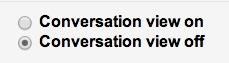
What happens when you turn off conversation mode? Just like in other mail clients you may have used, like Outlook or Entourage, your messages are each displayed on their own line. You will not see your own responses in your Inbox as you do in conversations - those will only be found in your Sent Mail.
On: 
Off:
Related Articles
Accessing Gmail from Chrome Browser
Once you have logged into the chrome browser you will see the the following page Click on Gmail to access you email.Signing into Google
Signing into Chrome is a great way to carry over bookmarks, saved passwords, search history, and all other Google related settings across multiple devices and platforms. Step 1: Open Chrome and find the person icon on the top right. If you’re on a ...Using Google Drive
https://support.google.com/drive/answer/2424384?hl=en&co=GENIE.Platform%3DDesktop Uploading files to Drive https://support.google.com/drive/answer/2424368 Work with Office files. https://support.google.com/docs/answer/6055139 Create, Edit and Format ...Getting Started with Google Calendar
To access Google Calendar make sure you are logged into your chrome browser and click on the 9 dots on the right hand side and you will see calendar as an option Click on it and it will open your calendar Additional helpful links for using Google ...Google Workspace and Learning Center
https://support.google.com/a/users/answer/9389764?visit_id=637819145571744419-553137852&hl=en&rd=1